View Security Information in Vendor Portal
The Security Center is Alpha. The features and functionality described on this page are subject to change.
In the Vendor Portal, the Security Center provides a dashboard for monitoring vulnerabilities across your releases, along with release-specific and customer-specific views of CVE information.
Security Center dashboard
The Security Center dashboard is available in the Vendor Portal at [App name] > Security.
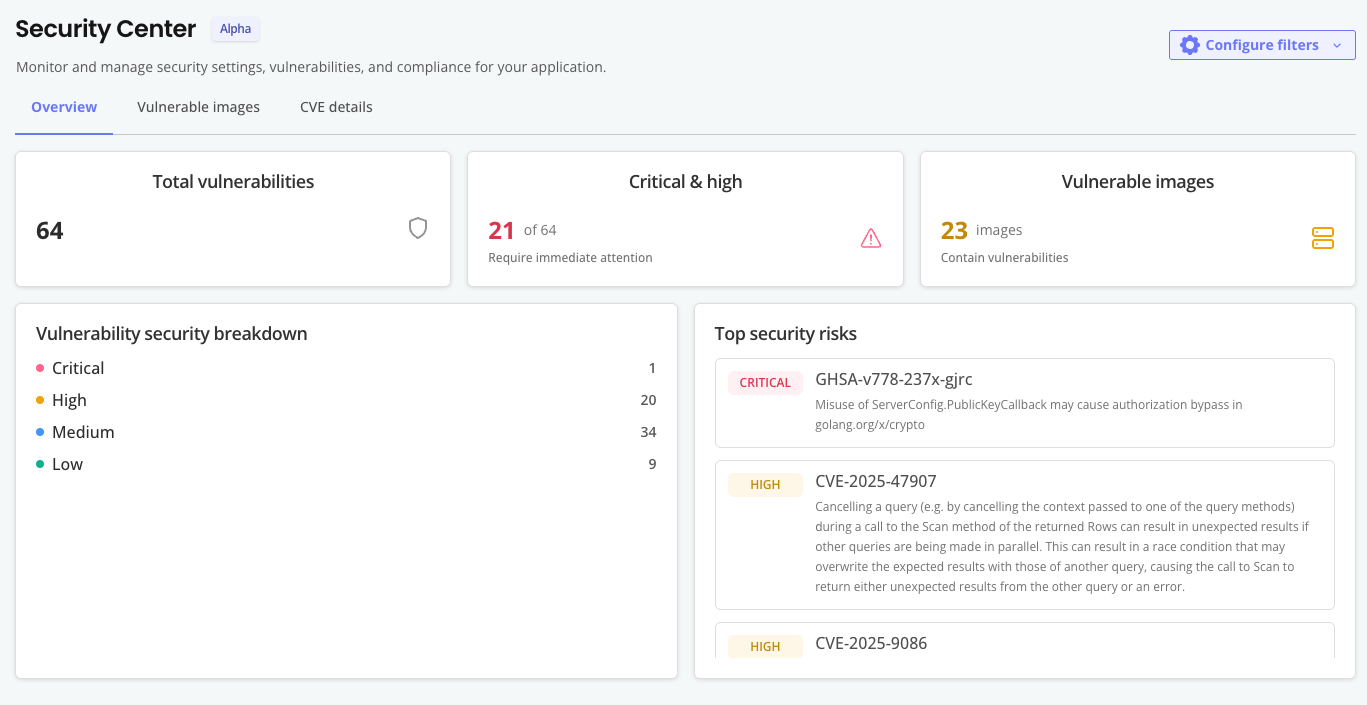
The following shows an example of the Security Center dashboard:
View a larger version of this image
You can filter for the information on the Security Center dashboard by release type (Linux/Embedded Cluster or Helm) and release channel. The information displayed on the Security Center dashboard applies to the currently promoted release of the selected type on the selected channel.
The Security Center dashboard includes the following:
- An overview of vulnerabilities present in the release, including a breakdown of CVE severity (Critical, High, Medium, Low) and a detailed list of the top security risks
- On the Container images tab, a complete list of scanned images with vulnerability counts per image
- On the CVE details tab, for each CVE identified:
- The CVE identifier and description
- The CVSS score and severity rating
- A list of images affected by the CVE
- Fixed versions (when available)
Release-specific CVE information
CVE details are available for all current and previously promoted application release versions. To view CVE information for a specific release, go to Releases > [Release Version] > Security.
Customer-specific CVE information
You can view CVE details at the customer level for active instances running the Replicated SDK version 1.9.0 or later. This gives you visibility into all container images running alongside your application, helping you identify security risks and urgent upgrade needs across your customer base.
To view CVE information for a specific customer instance, go to Customers > [Customer] > [Instance] > Security.